SM Service Centers
Use this form to set up the service centers that perform work for your company.
How to access:
Service Management > Programs > SM Service Centers
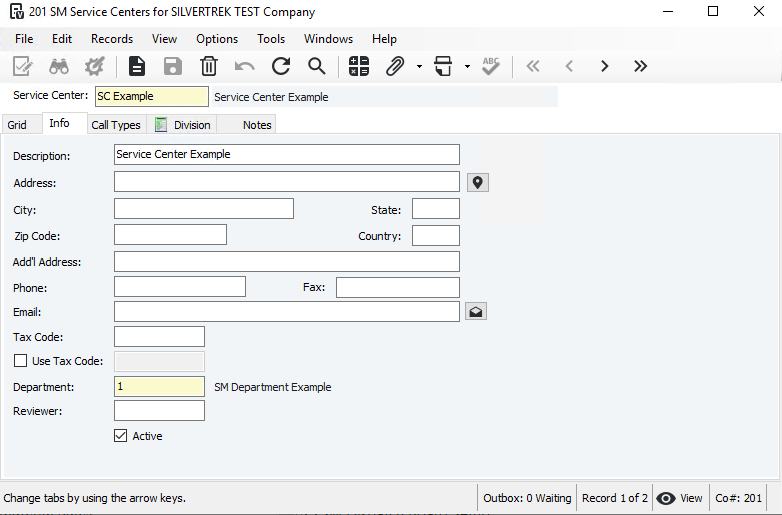
Service Center: Enter a number or code.
Description: Enter a description.
Address: Enter address, city, state, zip, and country (only if outside default country).
Add’l Address: Optional (e.g., P.O. Box).
Phone/Fax: Enter numbers.
Email: Enter the service center’s email.
Tax Code: Enter the sales tax code.
Use Tax: Check box and enter code if different; leave blank if not used or same as sales tax.
Department: Enter the department for GL account updates.
Active: Check if the service center is active.
Reviewer: Enter or select a reviewer to mark work orders ready to bill.
Save the record.
Assign Call Types:
Go to the Call Types tab.
Select applicable call types from Available Call Types (use Shift/Ctrl to select multiple).
Click Add to move them to Selected Call Types.
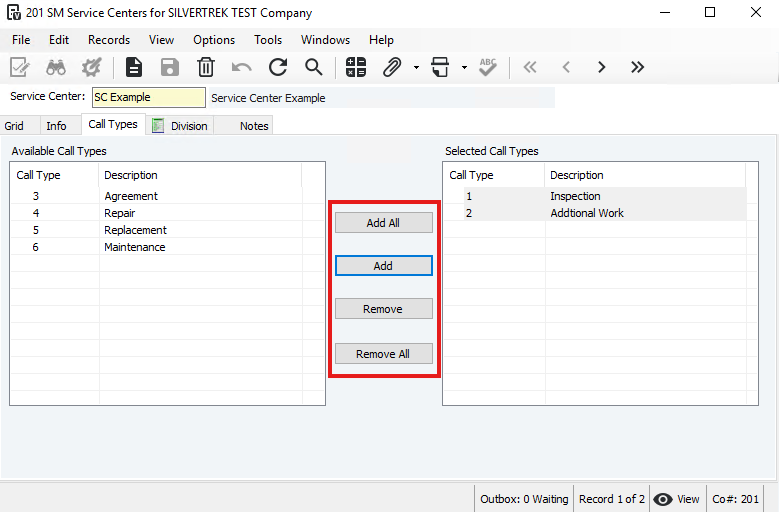
Note: You can use the Add All button to include all available call types in the Selected Call Types list. Likewise, you can remove call types from the Selected Call Types list and return them to the Available Call Types list using the Remove or Remove All buttons.
Was this article helpful?
That’s Great!
Thank you for your feedback
Sorry! We couldn't be helpful
Thank you for your feedback
Feedback sent
We appreciate your effort and will try to fix the article