Use the SM Technicians form to set up technicians who perform service work. Technicians must already exist in PR Employees so labor hours flow correctly to Payroll. If a technician works for multiple SM companies, you must create a technician record in each company and link it to the same PR employee.
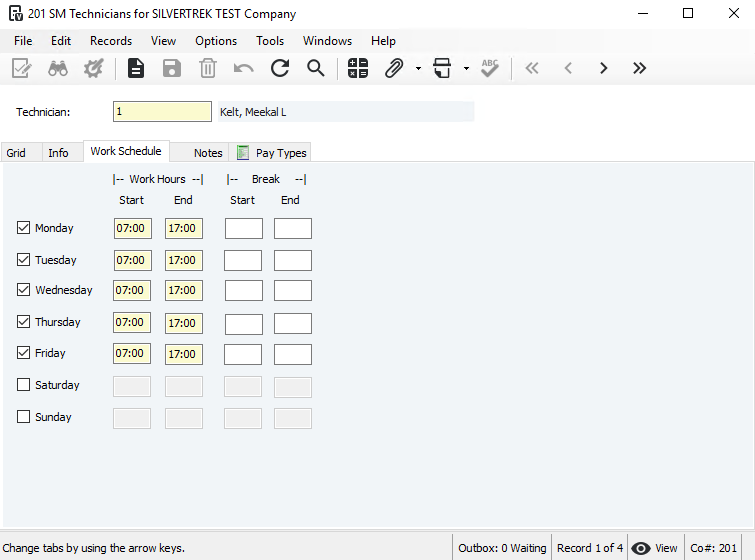
The Work Schedule tab defines technician availability for dispatching and scheduling.
The Rate represents the technician’s estimated hourly labor cost (base pay plus burden). This rate is used only when the pay type’s Cost Method is 0–Multiplier. The system multiplies the technician rate by the pay type factor to calculate the labor cost. If the pay type uses 1–Dollar Rate, the pay type rate overrides the technician rate.
The Default Material Location (IN Co and IN Location) defines where the technician typically pulls materials from, such as a service truck or warehouse. This location defaults on work completed inventory lines.
To set up a technician:
Go to Service Management > Programs > SM Technicians.
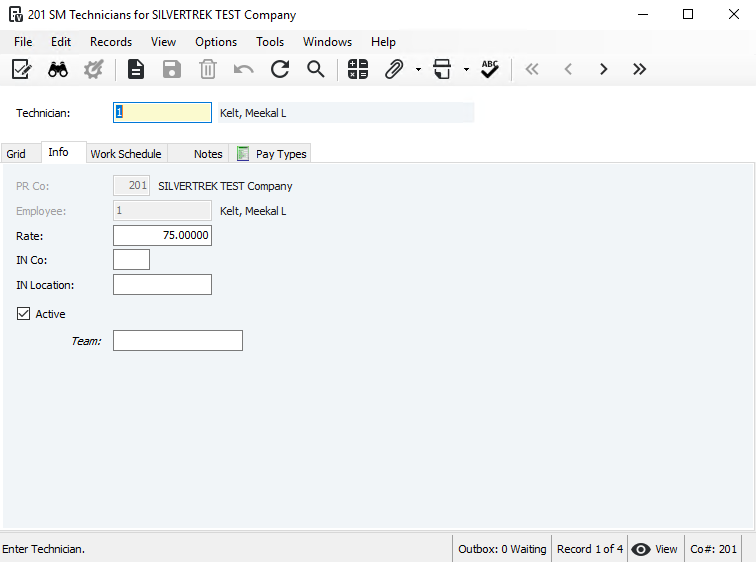
- Enter or select a Technician (type the name/number or use F4 to choose from PR Employees).
The system auto-fills PR Co and Employee.
- If not auto-filled, enter the PR Co and select the Employee.
Inactive employees can be saved, but must be activated to post transactions.
- Enter the technician’s Rate (used only when the pay type uses 0–Multiplier; otherwise the pay type rate applies).
- Enter the IN Co and IN Location where the technician typically pulls materials (truck, warehouse, etc.).
- Check Active to make the technician available.
- Save the record.
- Set up the technician’s Work Schedule.
Was this article helpful?
That’s Great!
Thank you for your feedback
Sorry! We couldn't be helpful
Thank you for your feedback
Feedback sent
We appreciate your effort and will try to fix the article