The SM Company Parameters form is used to configure Service Management (SM) companies and control options before processing work orders.
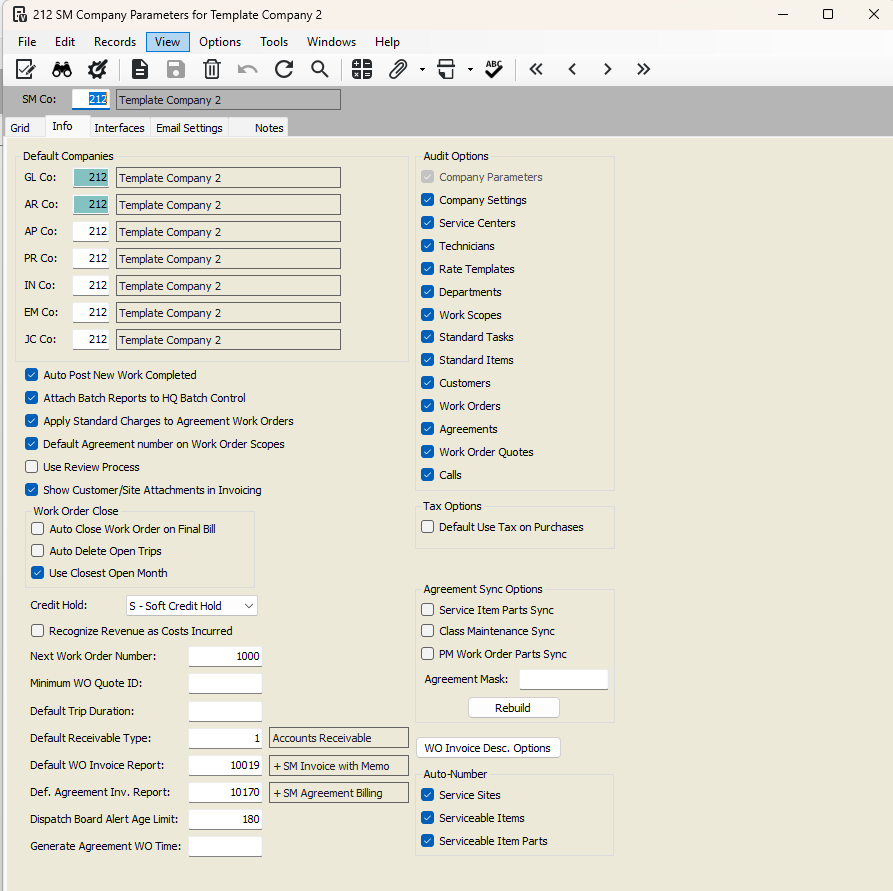
Key Settings
Agreement Mask
Use to select agreements when rebuilding material lists for agreement services.
Enter a full agreement number (e.g., 21000) or a partial number with
%(e.g., SM10%) to update multiple agreements.Click Rebuild to update material lists for Active or Quote agreements.
Auto Generate Agreement Work Order Trips
Automatically creates trips for work orders generated from agreements.
Each work order gets one trip, assigned to the Primary Tech.
Leave unchecked if you want to manually create trips.
Post Anticipated Costs to Job Cost
Select to post anticipated costs for labor/materials immediately.
Clear to post only actual costs when PR/AP updates occur.
Auto Post New Work Completed
Automatically creates and posts cost batches when entering work completed lines.
Does not apply to labor/purchase lines posted in other modules, imported/auto-added lines, or changes to already posted lines (those are handled automatically).
Apply Standard Charges to Agreement Work Orders
Automatically adds standard charges to work orders generated from agreements.
Leave unchecked to apply manually.
Default Agreement Number on Work Order Scopes
Defaults the agreement number for manually entered work order scopes when only one active agreement exists for a service site.
Next Work Order / Quote Number
Sets the starting number for auto-numbering work orders or quotes.
System automatically increments for new entries.
Use Review Process
Clearing this checkbox allows standard billing for all work completed lines.
Show Customer/Site Attachments in Invoicing
Displays attachments from customer/service site on invoices.
Only attachments with type AP Invoice appear on invoices.
Auto Close Work Order on Final Bill / Auto Delete Open Trips / Use Closest Open Month
Configure workflow for closing and posting work orders and trips.
Credit Hold
Default: S – Soft Credit Hold to alert users.
Recognize Revenue as Costs Incurred
Recommended to leave unchecked; revenue is recognized during billing.
Default Use Tax on Purchases
Automatically applies use tax on material-related work completed lines.
Default Trip Duration
Sets the default hours for trips created in the Dispatch Board (default 1 hour).
Default Receivable Type / Invoice Reports
Assigns default receivable type and custom invoice reports for work orders and agreements.
Dispatch Board Age Alert / Generate Agreement WO Time
Sets default for open job alerts and schedules agreement work order process runs.
Audit Options
Tracks updates to HQ Master Audit (HQMA) file. Recommended to enable all options.
Agreement Sync Options
Automatically updates agreement services or PM work orders when parts or class maintenance tasks change.
Includes Service Item Parts Sync, Class Maintenance Sync, and PM Work Order Parts Sync.
Auto-Numbering
Enables sequential numbers for Service Sites, Serviceable Items, and Serviceable Item Parts.
Email Settings
Configure From Address, Subject, and Body for automated emails.
Supports HTML formatting and company logos.
Was this article helpful?
That’s Great!
Thank you for your feedback
Sorry! We couldn't be helpful
Thank you for your feedback
Feedback sent
We appreciate your effort and will try to fix the article