Setting the Interface Options for an SM Company
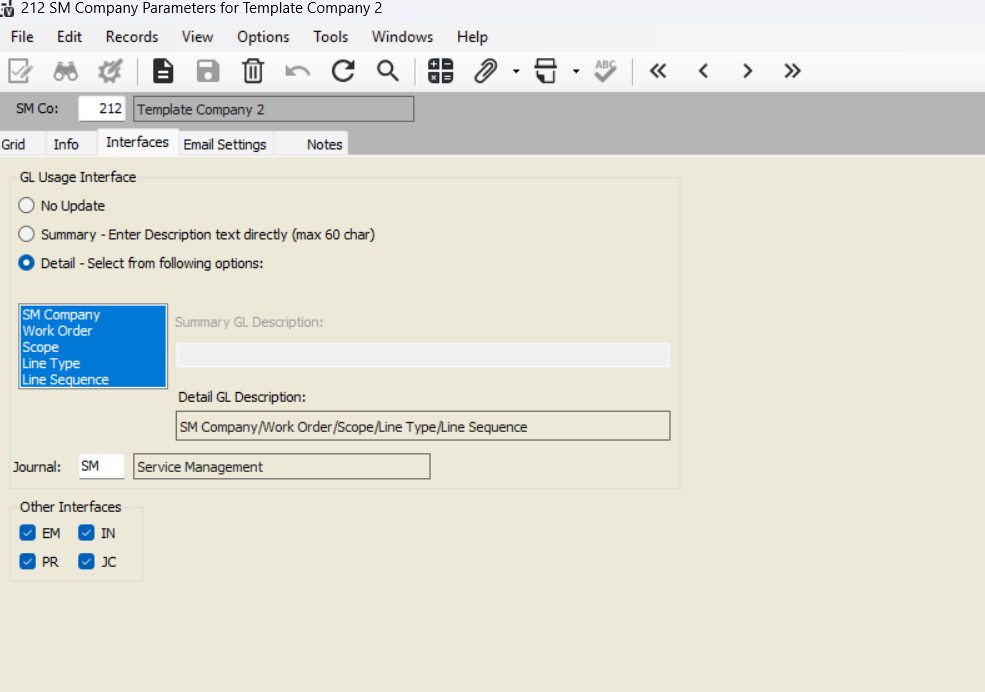
You can control how work completed data is processed and posted:
General Ledger (GL) Updates:
Choose how work completed entries update GL: No Update, Summary, or Detail.
For Summary, enter a description in Summary GL Description.
For Detail, select the items to include in Detail GL Description.
Specify the GL Journal to update or select from a list (F4).
Other Module Interfaces:
If using Equipment Management (EM), Inventory (IN), Purchase Order (PO), Payroll (PR), or Job Costing (JC), you can send work completed data to these modules.
Example: Selecting EM will create equipment usage entries in Equipment Management.
Setup Steps:
Enter the SM Company in the SM Co field.
Go to the Interfaces tab.
Configure GL interface level and descriptions.
Check the boxes for the other modules to interface data.
Was this article helpful?
That’s Great!
Thank you for your feedback
Sorry! We couldn't be helpful
Thank you for your feedback
Feedback sent
We appreciate your effort and will try to fix the article