SM Departments
Set up departments to define the GL accounts for cost and revenue on work orders.
Cost accounts are updated when posting work completed, depending on line type and WIP tracking.
Revenue accounts are updated when billing work completed.
Note: You must define GL accounts for all cost and revenue categories, even if not used.
How to access:
From the main menu: Service Management > Programs > SM Departments
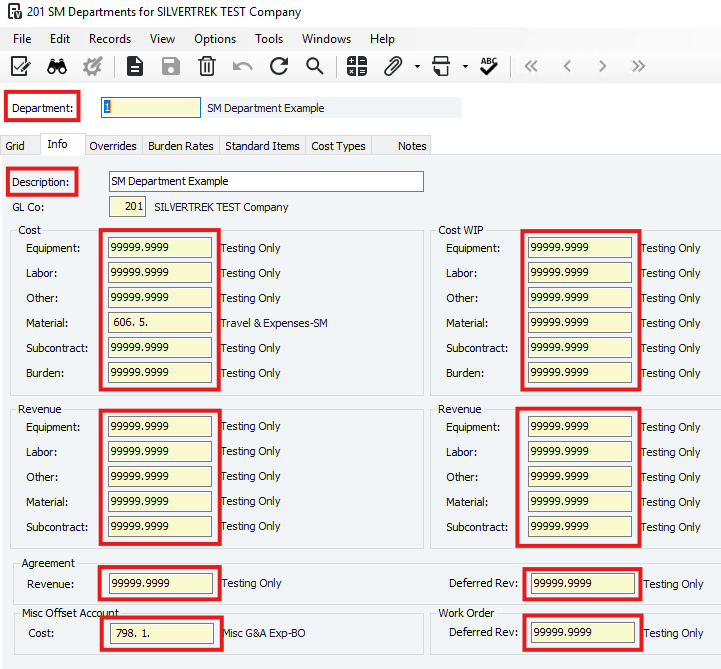
Department: Enter a code to identify the department.
Description: Enter a description for the department.
GL Accounts: Enter accounts for Cost, Revenue, Cost WIP, and Revenue WIP. Press F4 for valid accounts.
Agreement: Revenue: Enter the GL account for periodic service agreement billings.
Agreement: Deferred Rev: Enter the GL account for recognizing service agreement revenue.
Misc Offset Account: Cost: Enter the GL offset account for miscellaneous work completed lines.
Work Order: Deferred Rev: Enter the Work Order Revenue Deferral GL account.
Save the record.
Was this article helpful?
That’s Great!
Thank you for your feedback
Sorry! We couldn't be helpful
Thank you for your feedback
Feedback sent
We appreciate your effort and will try to fix the article