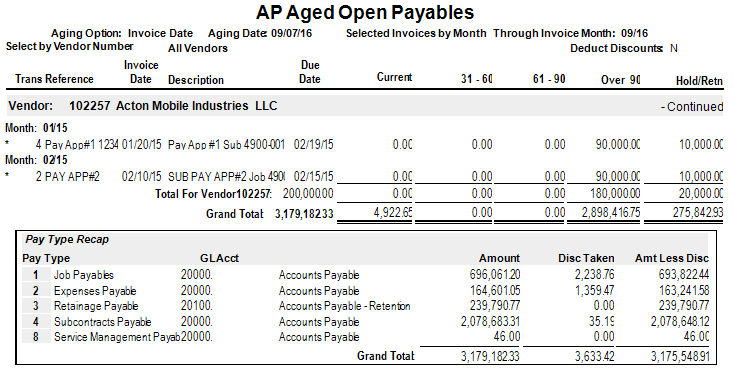
AP Aged Open Payables Report
Purpose: Shows the aging of AP invoices.
Access: Go to Accounts Payable > Reports > AP Aged Open Payables.
Report Options:
Aging Date: Used to categorize invoices by age.
Days Between Columns: Allows flexibility in aging.
Include Discounts: Option to include discounts in the invoice amounts.
Include Invoices After Aging Date: Option to include invoices dated after the aging date.
Note:
If Tax Basis is net of retainage is checked (in AP Company Parameters), retention/holdback tax will not appear in the Hold/Retainage column.
If unchecked, retention/holdback tax will appear in that column.
Report Parameters
Company:
Accept default or press F4 to select a company.
Sort by:
S for vendor name
N for vendor number
Vendor Sorting:
Beginning Vendor Sort Name: Press F4 to select starting vendor name.
Ending Vendor Sort Name: Press F4 to select ending vendor name.
Beginning Vendor Number: Press F4 to select starting vendor number.
Ending Vendor Number: Press F4 to select ending vendor number.
Aging Date:
Accept default or enter desired aging date.
Days Between Aging Columns:
Accept default or enter number of days.
Select by:
M for month
I for invoice date
Through Date:
Enter Through Invoice Month or Through Invoice Date.
Age by:
D for due date
I for invoice date
Deduct Discounts:
Check to deduct discounts from amounts.
AP Pay Category:
Press F4 to select a category or leave blank for all categories.
Print Vendor Totals Only:
Check to print vendor totals only, uncheck for invoice details.
Age Non-Retainage Hold Invoices:
Check to include non-retainage hold invoices in the aging.

Was this article helpful?
That’s Great!
Thank you for your feedback
Sorry! We couldn't be helpful
Thank you for your feedback
Feedback sent
We appreciate your effort and will try to fix the article