AP Invoices by Job/Work Order Report
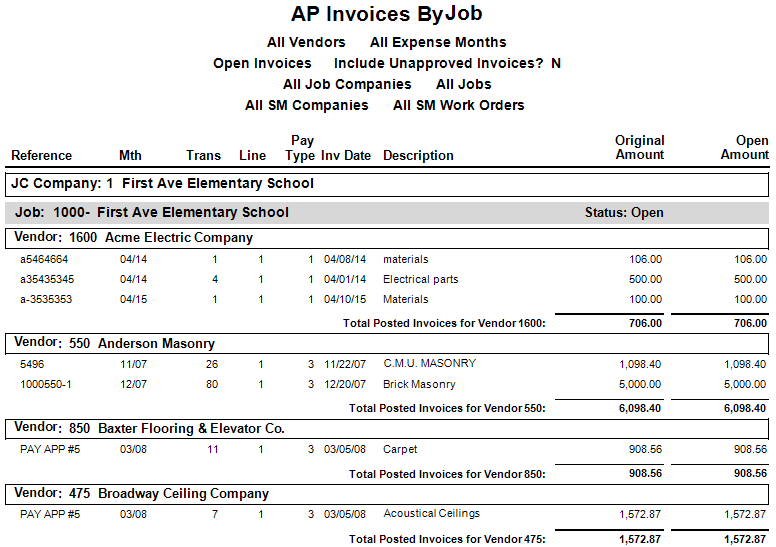
Purpose: View invoices by Job or Service (SM) Work Order.
Access: Go to Accounts Payable > Reports > AP Invoices by Job/WO.
Report Details:
Sorts by Job/Work Order, Vendor, and Reference
Shows invoice details at the line level, including the original amount and amount still open
Apply filters by Job, Work Order, or Vendor
Include jobs with specific status (Open, Soft Closed/Open, Closed) or work orders with a specific status
Filter by open invoices or invoices posted in a specific date/month range
Report Parameters
Company:
Accept default or select a company.
Vendor Name:
Select beginning and ending vendor names.
JC Company (Job Cost):
Select beginning and ending JC companies.
Job Filter:
Job Status: O (Open), S (Soft Closed/Open), C (Closed), A (All jobs)
Select to display open invoices only.
Sort By:
M for month or D for date.
Select beginning and ending months or invoice dates.
Unapproved Invoices:
Check to include unapproved invoices.
Job/Service Invoices:
J for Job invoices, S for Service invoices, or B for both.
Work Order Filters:
Work Order Status: Select status or leave blank for all.
Work Order Groups:
Check to break out work order groups.
Was this article helpful?
That’s Great!
Thank you for your feedback
Sorry! We couldn't be helpful
Thank you for your feedback
Feedback sent
We appreciate your effort and will try to fix the article