Use a GL Journal Entry to move amounts between GL accounts.
Steps:
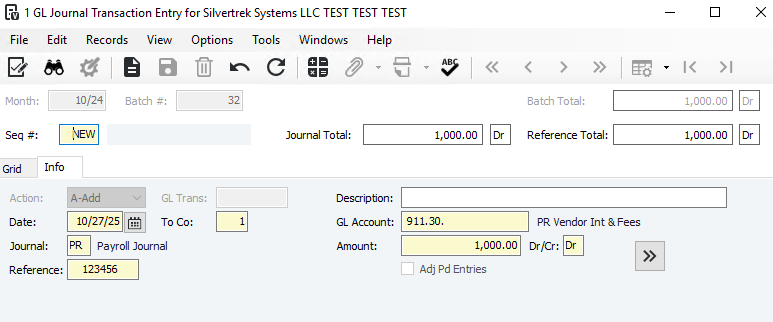
Go to GL > Programs > GL Journal Transaction Entry
Create a batch in the correct month
Add a new sequence and enter the journal details
Use the blue chevron to add offsetting entry lines
Go to File > Process Batch
Preview reports, then post the batch when the batch total is 0
Unbalanced entries are typically only used for beginning balances.
Important Notes:
GL Journal Entries only affect the GL
They do not appear in subledgers
If another module must be updated:
WIP account: use a JC Cost Adjustment
Cash account: use a CM Outstanding Entry
Was this article helpful?
That’s Great!
Thank you for your feedback
Sorry! We couldn't be helpful
Thank you for your feedback
Feedback sent
We appreciate your effort and will try to fix the article