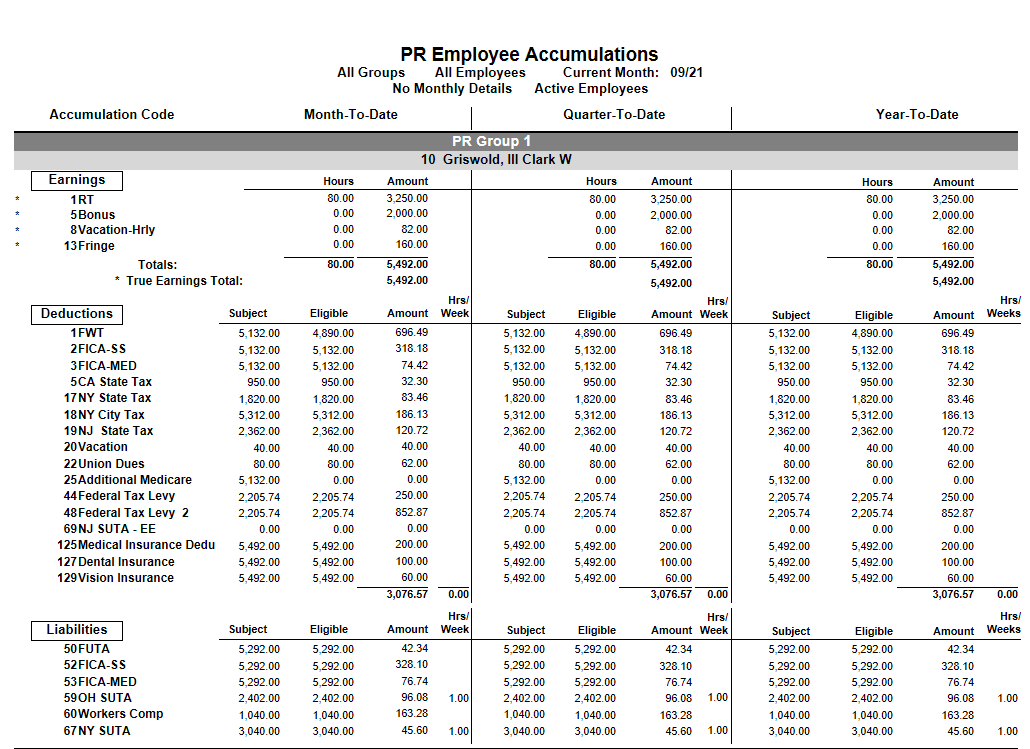
The PR Employee Accumulation Report is used to verify payroll deductions and liabilities and to support tax reporting (W-2s, 941s).
Important:
Run this report only after all payrolls are closed and the Ledger is updated, since the report pulls from the Ledger.
Report Columns
The report has three columns:
MTD (Month-to-Date): Totals for the selected month
QTD (Quarter-to-Date): Totals for the quarter through that month
YTD (Year-to-Date): Totals from January 1 through that month
Example: Entering 9/21
MTD = September only
QTD = July–September
YTD = January–September
Report Sections
The report shows data by employee and in totals:
Earnings
Deductions
Liabilities
Balancing Tips
1. Verify Federal Taxable Wages
Start with gross earnings
Subtract pre-tax deductions
Compare the result to the Subject amount for Federal Tax (Deduction #1)
If the amounts don’t match, check setup:
Some earning codes may not be linked to Federal Tax
This is a setup issue, not a calculation error
2. Verify Other Taxes (FICA, etc.)
Check the Subject amount for each tax (e.g., Deduction #2 for FICA)
Subject wages should match taxable earnings for that tax
Subject vs Eligible
Subject: Wages subject to a tax or deduction
Eligible: Subject wages up to a limit (used for capped taxes)
Normally, Subject = Eligible
If a limit is reached, Eligible will be lower
Example:
Subject wages = $150,000
FICA limit = $142,800
Eligible = $142,800
Quick Checklist
Payrolls closed and Ledger updated
Correct date selected
Taxable wages match deduction Subject amounts
Earning codes correctly linked to deductions
Subject vs Eligible amounts make sense
Fix any setup issues found.
Was this article helpful?
That’s Great!
Thank you for your feedback
Sorry! We couldn't be helpful
Thank you for your feedback
Feedback sent
We appreciate your effort and will try to fix the article